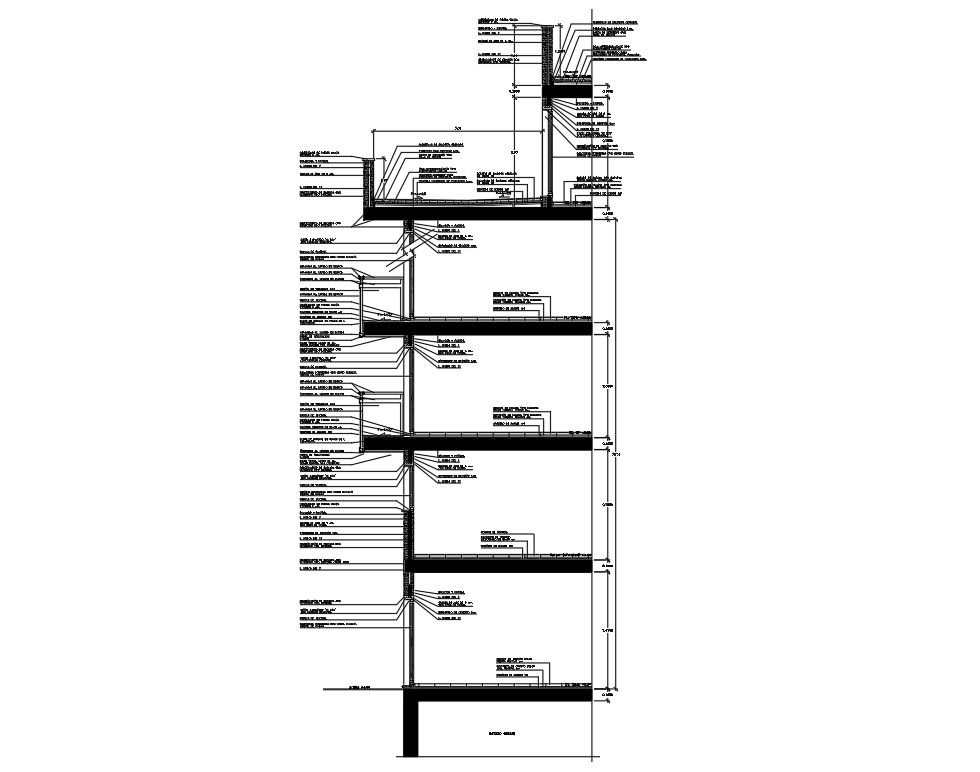
Building Section Design AutoCAD DWG Drawing with Floor Levels
Tags
Ratings & Reviews
Be the first to share your experience with this product. Your review helps others make better decisions!
Description
This building section design AutoCAD DWG drawing file provides a clear and detailed sectional view of a multi-storey building structure used for residential and commercial projects. The drawing illustrates a vertical section cutting through the building, showing floor-to-floor heights, slab thickness, beam depth, column alignment, staircase position, and roof structure. Standard measurements such as floor height of 3000 mm, slab thickness of 120 mm to 150 mm, plinth level, parapet height, and foundation depth are clearly indicated. The section also represents wall thickness, internal room heights, and structural continuity from foundation to roof level, helping users understand spatial and structural relationships.
This building section design AutoCAD DWG file is useful for architects, civil engineers, interior designers, and builders involved in design development and construction documentation. The drawing supports professional workflows in AutoCAD, 3d Max, Revit, and Google SketchUp for drafting, coordination, and presentation. With clean line work, readable annotations, and scalable dimensions, this building section drawing helps reduce drafting time and improve accuracy during planning and execution stages. It serves as a reliable reference for building section detailing and is available through cadbull.com subscription access for professional architectural and engineering projects.

File Type:
Autocad
Category::
Structure

Sub Category::
Section Plan CAD Blocks & DWG Drawing Models

type:
Free

Uploaded by:
Priyanka Patel
Tags
Ratings & Reviews
Be the first to share your experience with this product. Your review helps others make better decisions!