Steel Structure Detail Drawing with Beam Column Fixing Shoe System
Tags
Ratings & Reviews
Be the first to share your experience with this product. Your review helps others make better decisions!
Description
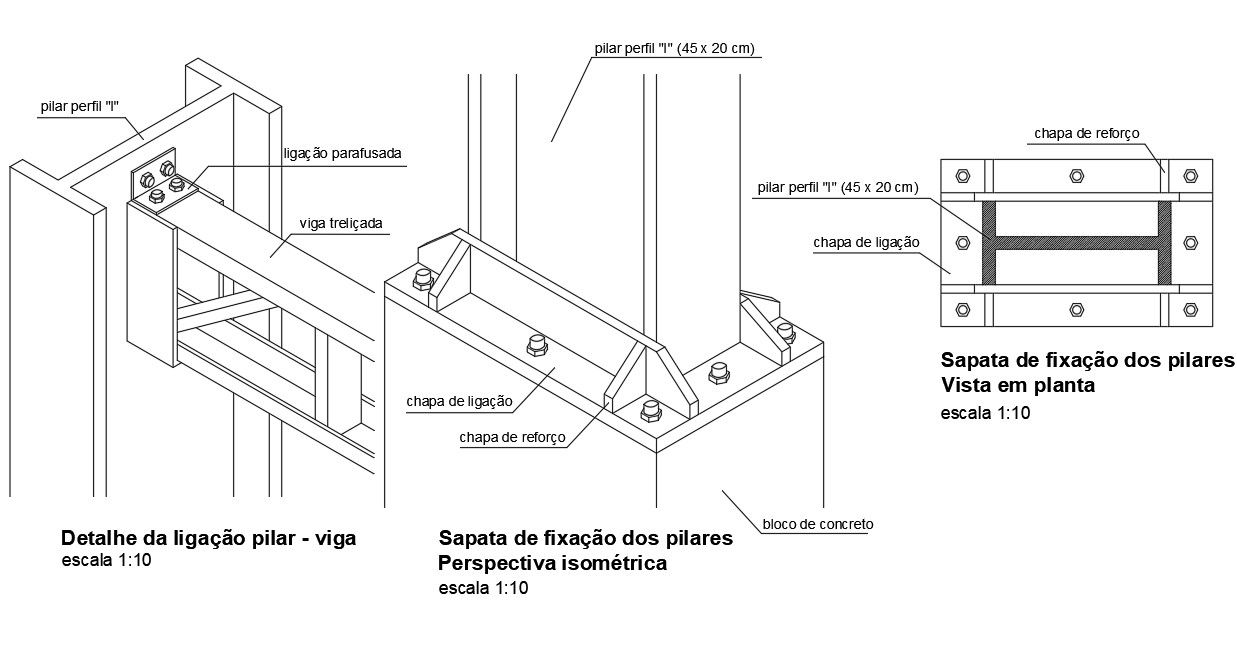
This Steel Structure Detail AutoCAD drawing presents a comprehensive set of connection details for steel columns and beams used in structural frameworks. The drawing illustrates a screwed connection between an I-section steel pillar and a trussed beam using bolted connection plates. A detailed pillar profile sized 45 x 20 cm is shown with clear fixing logic. The beam to column joint is represented in isometric perspective at scale 1:10, highlighting the use of connection plates, reinforcement plates, and bolted fastening for secure load transfer. All elements are accurately labeled to support correct fabrication and installation.
The drawing also includes a fixing shoe detail for steel pillars anchored into a concrete block foundation. Plan view and perspective views clearly explain the base plate arrangement, reinforcement plate positioning, bolt layout, and concrete block interface. Dimensions, plate thickness, and fixing locations are clearly indicated to ensure construction accuracy and structural stability. This AutoCAD DWG file is suitable for architects, civil engineers, structural designers, and builders working on steel structure coordination and execution drawings. Available through cadbull.com subscription, this steel structure detail drawing supports professional CAD drafting, precise structural documentation, and reliable implementation of steel beam and pillar connection systems.

File Type:
Autocad
Category::
Structure

Sub Category::
Section Plan CAD Blocks & DWG Drawing Models

type:
Free

Uploaded by:
Priyanka Patel
Tags
Ratings & Reviews
Be the first to share your experience with this product. Your review helps others make better decisions!