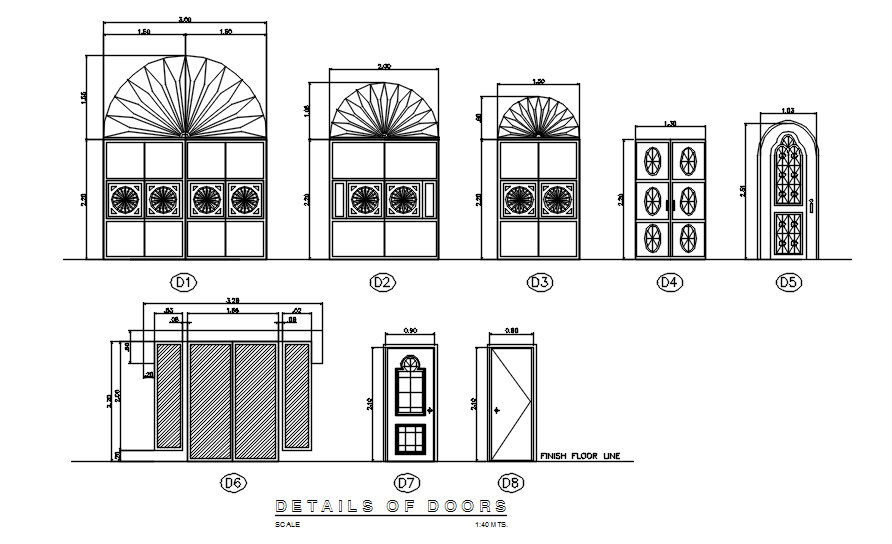
Different door elevation 2D blocks in AutoCAD, dwg file, CAD file
Tags
#Different door elevation 2D blocks in AutoCAD#dwg file#CAD file#D drawing#2D design#2D blocks#2D plan#AutoCAD drawing#AutoCAD design#AutoCAD plan#AutoCAD blocks
Ratings & Reviews
⭐
No Reviews Yet
Be the first to share your experience with this product. Your review helps others make better decisions!
★★★★★
Description
This architectural drawing is Different door elevation 2D blocks in AutoCAD, dwg file, CAD file. The side on which the hinges are located is typically shown when a door is displayed in elevation. To accomplish this, draw a dotted line connecting the top and bottom corners of the door on one side to the door's center on the other. For more details and information download the drawing file.

Uploaded by:
viddhi chajjed
Tags
#Different door elevation 2D blocks in AutoCAD#dwg file#CAD file#D drawing#2D design#2D blocks#2D plan#AutoCAD drawing#AutoCAD design#AutoCAD plan#AutoCAD blocks
Ratings & Reviews
⭐
No Reviews Yet
Be the first to share your experience with this product. Your review helps others make better decisions!
★★★★★